ProfitMaps AI Review: Is This Local SEO Tool Worth It? 
Explore ProfitMaps AI’s Google Maps geo-grid tracking, competitor analysis, AI action plans, reporting tools, pricing and practical limitations.
Explore ProfitMaps AIIllustrative graphic only. Not an actual product screenshot or client result.
ProfitMaps AI aims to make this process simple by providing geographic rank tracking, competitor analysis, AI-generated recommendations, and client reporting tools.
In this ProfitMaps AI review, we will take a look at features, how the software works, plans, pricing, advantages, and disadvantages. We also consider who could gain from it and if it’s a good idea for local SEO professionals and agencies.
What Is ProfitMaps AI?
ProfitMaps AI is a cloud-based local SEO platform designed to help marketers, freelancers and agencies analyse a business’s visibility across Google Maps.
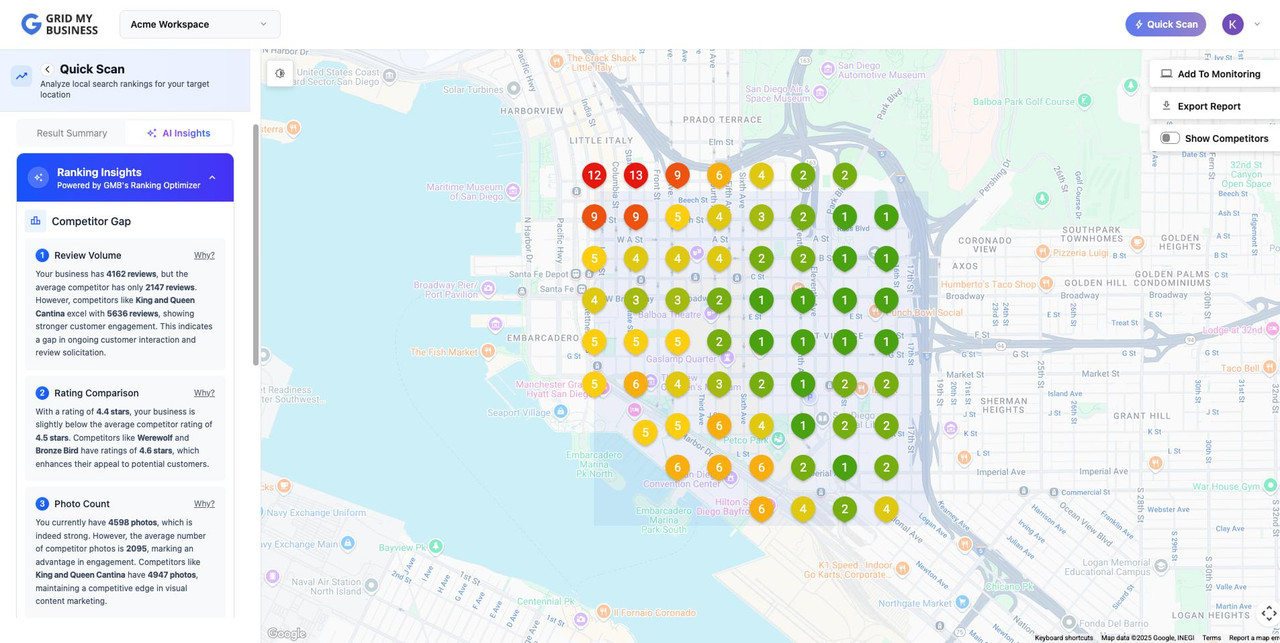
Its main feature is geographic rank tracking. Instead of checking a business’s position from just one location, the software scans multiple points around the business and displays the results on a visual map. This can help identify areas where a business appears prominently and locations where competitors receive better visibility.
The platform also includes competitor analysis, AI action plans, branded reports, website generation, lead capture and content creation tools. Its intended workflow connects local visibility analysis with client reporting and prospect conversations.
How Does ProfitMaps AI Work?
The platform connects local business research with geographic scanning and client reporting. The general workflow has four stages.
Choose a local business
Select a business that depends on local customers, such as a plumber, dentist, restaurant, salon or roofing company. On Basic, you choose the business yourself. Business Finder is included with Gold and Platinum.
Run a Google Maps scan
Enter a relevant search term and scan a grid of locations around the business. Each grid point displays the ranking position found at that location at the time of the scan.
Review competitors and recommendations
Examine which businesses appear ahead across the scanned area. The software can generate a plain-English action plan based on the scan data. Review those recommendations before using them.
Share a report and discuss next steps
Create a PDF or shareable report with your business name and logo where supported. You then decide whether to contact the business and offer relevant services.
Who Is ProfitMaps AI For?
Local SEO freelancers
Can use geo-grid scans to identify local visibility gaps and explain findings to prospective clients.
Digital marketing agencies
May find the reporting, client workspaces and white-label options useful when managing local business accounts.
SEO consultants
Can use competitor visibility information as one part of a wider local SEO review.
Website designers
May find the website builder and lead capture functions relevant when offering additional services to local businesses.
Beginners may also find the visual reports easier to understand than technical SEO data. However, software does not replace SEO knowledge, client communication or the work needed to implement recommendations.
ProfitMaps AI Features: What Do You Get?
Here are the main capabilities described on the current official product page.
Google Maps geo-grid scans
Checks a keyword across multiple geographic points. Basic includes a 5×5 grid, with larger grids available under supported plan and data-key conditions.
Competitor view
Shows which businesses appear ahead of the selected business across the scanned locations.
AI action plan
Creates a numbered list of suggested next steps using the scan information as its starting point.
Branded reports
Generates a PDF and read-only share link. Branding and white-label options depend on the selected plan.
Website generator
Includes an AI site planner and website builder with an editor. The Basic plan lists 10 websites.
Lead capture
Generated websites can collect enquiries, which are sent to the user’s leads inbox.
Post and article writers
Creates Google Business Profile post drafts and local page articles. Check facts and business details before publishing.
Keyword finder
Lets users enter a website and town to see keywords for which that website already ranks.
Ranking history and recurring scans
Supports scan comparisons over time and scheduled repeat scans. Each recurring run uses credits.
CSV export and AI connection
Exports scan points and competitor data as CSV and supports connecting a compatible AI assistant through MCP.
What the software does — and what you still do
| ProfitMaps AI can help with | You remain responsible for |
|---|---|
| Finding and scanning a business | Choosing the business and search terms |
| Showing geographic ranking patterns | Interpreting the results in context |
| Preparing reports and suggested actions | Checking the information and recommendations |
| Drafting pages and Google posts | Editing, fact-checking and publishing content |
| Supporting a prospecting workflow | Contacting prospects, setting prices and delivering services |
ProfitMaps AI Pricing and Plans
The current official product page lists three one-time payment plans. These are the prices displayed on the product page at the time this review was prepared. Always confirm the checkout page before purchasing, as terms and availability can change.
- 10 businesses, 2 keywords each
- Map scans and competitor analysis
- 5×5 grid; larger scans subject to conditions
- 10 generated websites
- Lead capture
- Post and article writers
- AI site planner and MCP connection
- Everything in Basic with larger limits
- White-label reports
- Email follow-up for new leads
- Business Finder
- Client workspaces and logins
- Team members
- Pitch Pack templates and scripts
- Everything in Gold
- No stated cap on businesses, keywords or websites
- Business Finder with fair-use terms
- Expanded agency workspaces and team access
- Larger grid sizes with your own data key
Do the plans include unlimited usage? Not necessarily. The official page says scans, lookups and AI writing use credits on every plan, including Platinum. Users can buy credits or connect their own supported accounts for certain data and AI functions. Grids above 9×9 require the user’s own data key.
The Basic plan requires you to choose businesses yourself. Business Finder is listed with Gold and Platinum. Check the current plan screen and checkout for the precise limits that apply to your purchase.
ProfitMaps AI Pros and Cons
✓ Potential advantages
- Visual geographic ranking analysis.
- Competitor visibility information.
- AI-generated action-plan drafts.
- PDF and shareable reports.
- Website creation and lead capture tools.
- Content drafting features.
- Agency tools on higher plans.
! Limitations to consider
- Scans and AI tasks consume credits.
- Basic has lower business and keyword limits.
- Some agency functions require higher plans.
- AI content needs human review.
- It does not guarantee higher rankings.
- Client acquisition still requires your effort.
- Some larger grids require your own data key.
ProfitMaps AI vs Traditional Local SEO Rank Tracking
ProfitMaps AI combines several local marketing functions. However, it should not automatically be treated as a complete replacement for a dedicated SEO platform.
| Area | ProfitMaps AI | Other SEO platforms |
|---|---|---|
| Geographic visibility | Geo-grid scans are a core feature | Depends on the tool and plan |
| Competitor view | Included in its local scan workflow | Varies by platform |
| AI action plans | Included | May require separate tools |
| Website generation | Included | Usually a separate product |
| Lead capture | Included on generated sites | Usually separate |
| Backlink and technical audits | Not established as core features | Some dedicated platforms provide these |
If you need backlink research, deep technical auditing, broad keyword databases or multi-engine rank tracking, compare those requirements with a specialist SEO platform before deciding.
Is ProfitMaps AI Worth It?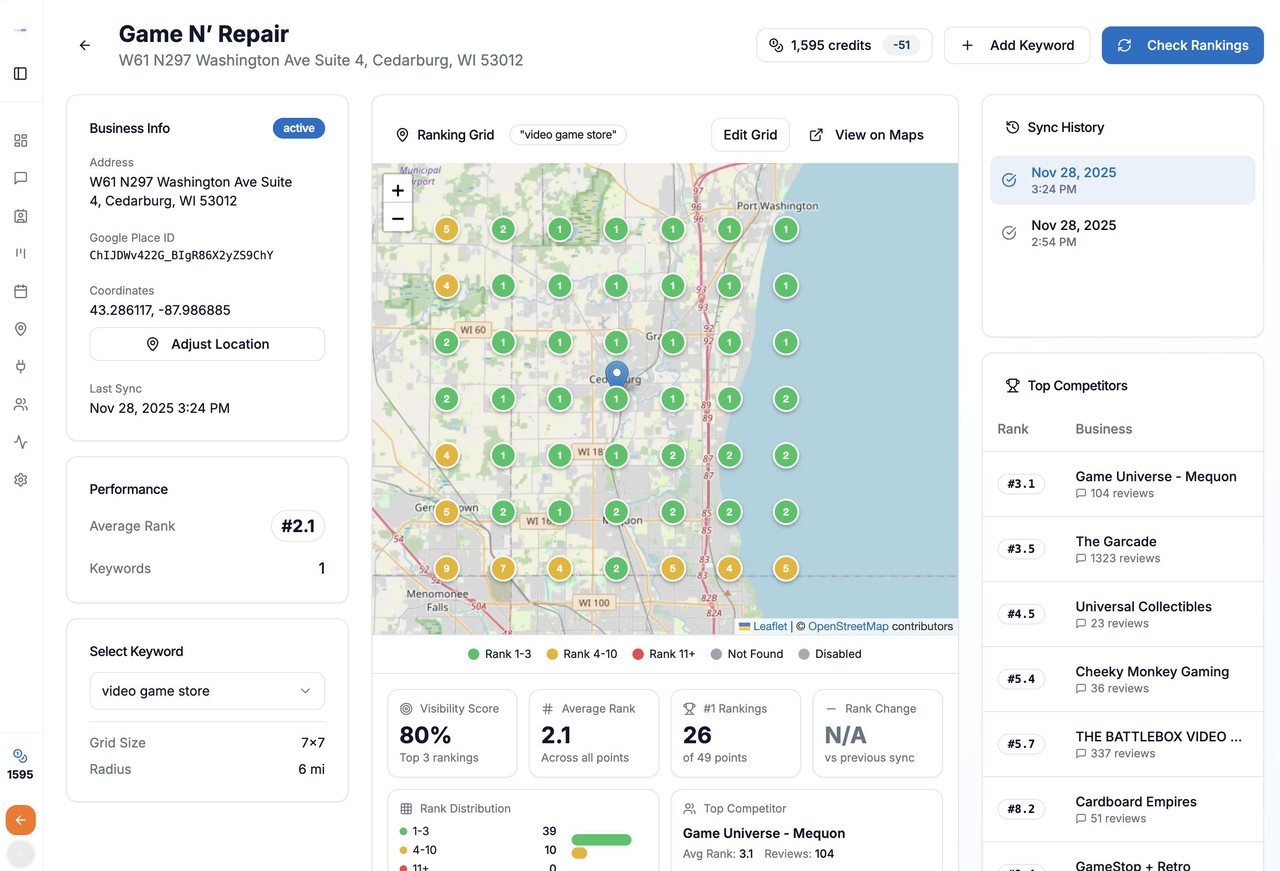
ProfitMaps AI may be worth considering if your work focuses on local businesses and Google Maps visibility. Its main appeal is the combination of geographic rank tracking, competitor analysis, AI-generated action plans and client reporting.
For freelancers and agencies, the visual reporting workflow may help explain local search opportunities to business owners. The website and lead capture tools may also be useful if you provide a broader local marketing service.
There are still a few points to consider. Check the plan limits, calculate how often you expect to run scans, understand credit usage and decide whether you need the website builder and agency features. Also remember that local search rankings depend on factors outside any single software platform’s control.
Who should consider it?
- Local SEO freelancers who prepare ranking reports.
- Small digital marketing agencies managing local clients.
- Consultants offering Google Maps visibility services.
- Web designers who also provide local marketing services.
- Marketers who want visual geographic ranking analysis.
Who may want to avoid it?
- Users expecting guaranteed Google rankings or income.
- People who want completely automated client acquisition.
- SEO professionals whose main need is advanced backlink or technical auditing.
- Users who do not want to manage scan and AI credits.
- Businesses that do not need local search analysis.
Frequently Asked Questions About ProfitMaps AI
1. What is ProfitMaps AI?
ProfitMaps AI is a cloud-based local SEO platform offering Google Maps geo-grid rank tracking, competitor analysis, AI action plans, reporting, website creation and lead capture.
2. How does ProfitMaps AI track Google Maps rankings?
It scans multiple geographic points around a selected business and displays the ranking position found at each point at the time of the scan.
3. Does ProfitMaps AI include competitor analysis?
Yes. Its competitor view identifies businesses appearing ahead of the selected business across the scanned locations.
4. Can ProfitMaps AI help local SEO agencies?
It may help agencies with geographic ranking analysis, reporting, prospecting and client management. Agencies still need to perform SEO work and manage client relationships.
5. Does ProfitMaps AI generate websites?
Yes. The platform includes an AI site planner and website builder. The number of websites and related limits depend on the selected plan.
6. Does ProfitMaps AI offer white-label reports?
Branded reports are available, while expanded white-label and agency features depend on the selected plan. Check the current plan details for exact inclusions.
7. How much does ProfitMaps AI cost?
The current official product page displays Basic at $37, Gold at $297 and Platinum at $797 as one-time payments. Check the live checkout for current prices, limits and terms.
8. Does ProfitMaps AI require SEO experience?
The platform aims to make some local SEO tasks easier to understand. Users still need to evaluate scan results, verify AI recommendations and deliver appropriate services.
9. Does ProfitMaps AI guarantee higher Google Maps rankings?
No. It helps users analyse local visibility and plan possible improvements, but it does not guarantee higher rankings, traffic, income or clients.
10. Is ProfitMaps AI suitable for beginners?
It may suit beginners interested in local SEO services because it offers visual reports and AI-generated recommendations. Learning local SEO fundamentals is still important before offering services to paying clients.
Should You Buy ProfitMaps AI?
ProfitMaps AI brings several local marketing functions together in one platform. Its geographic rank tracking, competitor analysis, AI action plans and branded reporting are particularly relevant to people working with local businesses.
However, it is important to understand what the software does and what it does not do. It can help identify local ranking opportunities, organise information and prepare client-facing materials. It cannot guarantee better Google Maps positions, close clients automatically or replace professional SEO work.
Before purchasing, review the current pricing, scan-credit requirements, plan limitations and checkout terms. If these features match your workflow, ProfitMaps AI may be worth exploring.
Visit the Official ProfitMaps AI PageSources and References
The review uses the following product and reference information. Product features and prices can change, so check the official pages before purchasing.
- ProfitMaps AI – Official Product Information, Features and Plans
- ProfitMaps AI – Terms of Service
- ProfitMaps AI – JV Information
- Google Business Profile – Improve Local Ranking
Editorial note: This is a research-based review of publicly available product information, not a claim of hands-on product testing. Sample maps, businesses and rankings shown in the visual above are illustrative only. ProfitMaps AI does not guarantee ranking, traffic, income or client results. Google and Google Maps are trademarks of Google LLC; ProfitMaps AI is not affiliated with or endorsed by Google.